Choosing the right boardroom seating involves more than matching leather to a polished conference table. Executive Boardroom Chairs influence posture, attention, conversation, and the room’s overall authority. A two-hour budget meeting can expose weak lumbar support, restricted armrests, or a seat that traps heat. Comfort matters. Looks can mislead.
This guide presents ten practical tips for evaluating executive seating with greater confidence. It considers adjustable height, lumbar support, seat depth, armrest movement, base stability, upholstery, and cleaning requirements. It also examines how chair dimensions interact with table height and walking space. Reliable specifications matter, but real-world testing matters more. A chair may appear ideal online and feel unsuitable after twenty minutes.
Professional buyers should compare manufacturer data, warranty terms, user feedback, and relevant ergonomic guidance before approving a large order. Whenever possible, test a sample chair with the actual table, flooring, and meeting duration. Ask different users for honest feedback, including shorter and taller team members. No model suits everyone. Even a premium chair can disappoint when selected by appearance alone. That is a useful limitation to acknowledge.
The following ten tips combine workplace experience, practical design knowledge, and careful product evaluation. They aim to support a decision that feels refined, functions reliably, and remains comfortable through demanding discussions. The best choice may not be the most expensive one. It should be the chair people can use confidently, day after day.

Tip 1: Define the room’s real purpose before choosing executive boardroom chairs. A room used for negotiations needs a different feel from one used for weekly planning. Measure meeting length, table size, and movement needs. A polished chair can still fail when people sit for three hours.
Tip 2: Identify who will use the room most often. Senior leaders may prefer deeper seats and supportive backrests. Visitors may need easier entry and adjustable height. Include people of different heights and body types in the evaluation. Their feedback often reveals problems that specifications miss. I once focused too heavily on appearance and overlooked limited legroom. That mistake was expensive to correct.
Tip 3: Match chair features to actual work habits. Users who review documents need stable arm support and comfortable posture. Teams using laptops need enough clearance beneath the table. Choose materials that tolerate frequent cleaning and daily contact. Avoid adding every available adjustment without a reason. Too many controls can confuse guests and slow meetings. Test sample chairs in the actual room, under its lighting and table height. Record pressure points after a full meeting, not just five minutes. A practical trial offers stronger evidence than showroom impressions.
Use this practical 1–5 planning benchmark to match chair priorities with the people using the boardroom. A score of 5 indicates a critical requirement, while 1 indicates a lower priority.
Executives and long-session participants generally need stronger ergonomic support and adjustability, while visitors and short-meeting users may place greater emphasis on appearance, easy movement, and flexible seating.
Executive boardroom chairs should support concentration, not merely look impressive around a polished table. Comfort begins with balanced pressure across the seat, stable back support, and enough room to change posture. During a two-hour meeting, a rigid cushion can create numbness, while excessive softness may reduce support.
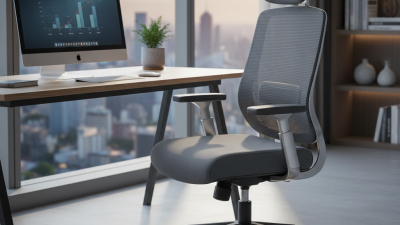
Test each chair with real users before making a decision. Adjust the seat height so feet rest flat and knees remain close to a right angle. Seat depth should support the thighs without pressing behind the knees. A responsive backrest should follow movement, while adjustable lumbar support should fit different body shapes. Armrests must slide beneath the table without forcing shoulders upward.
Small details matter. Check the control handles from a seated position. They should be clear and easy to operate. Tilt tension should allow relaxed movement without sudden drops. I once preferred a deep executive chair because it felt luxurious. After an hour, however, its fixed lumbar position caused lower-back fatigue. That experience changed my testing method. I now evaluate chairs at fifteen-minute intervals, not after a quick showroom sit. It is an imperfect method, but it reveals pressure points more honestly. Ask several employees to record comfort, movement, and adjustment issues. Their feedback may challenge the expected choice.
Executive boardroom chairs should look composed, but appearance cannot replace sound construction. In real meeting rooms, chairs face hours of sitting, frequent movement, and occasional careless handling. Choose upholstery that resists abrasion, stains, and fading. Full-grain leather feels refined, while high-quality fabric may offer better breathability. Avoid judging materials by texture alone. A soft surface can hide weak backing.
Inspect the frame, joints, and base closely. A solid metal or properly engineered wooden frame should feel stable without unnecessary weight. Test the chair for rocking, creaking, or uneven movement. These small faults often become expensive problems later. Check whether the casters roll smoothly across your actual flooring. Polished surfaces may scratch easily, so finish quality matters. Ask about foam density, because thin foam can flatten after repeated daily use. Comfort is not decoration.
Adjustability supports long-term performance. Look for reliable height control, firm armrests, and a backrest that supports different postures. A synchronized tilt mechanism can reduce pressure during extended discussions. Materials should also be easy to clean, especially around shared conference tables. Request maintenance instructions and information about replacement parts. Many buyers forget this detail. They regret it later.
Durability claims deserve evidence. Review testing standards, weight limits, warranty terms, and repair support before purchasing. Sit in each chair for at least ten minutes, then inspect it again. The most impressive model may not suit every user. A practical choice balances structure, comfort, maintenance, and expected use. Leaving room for doubt is wise.
A boardroom chair should speak the room’s professional language. Start with proportion. A tall, structured chair suits a formal room with a dark wood table. A slimmer silhouette feels better in a modern, glass-walled space.
Choose upholstery that supports the room’s message. Fine-grain leather suggests authority, while textured fabric can soften a rigid setting. Avoid excessive gloss. It often looks impressive in photographs, but fingerprints and glare can weaken the room’s appearance. Match the chair’s color with flooring, wall tones, and table edges. Keep contrast controlled. Consider back height, arm width, swivel movement, and seat depth. A chair that blocks eye contact damages discussion. A chair that rolls too freely can feel careless. Test every model at the actual table.
Ergonomics should remain visible through restraint. The International Ergonomics Association emphasizes fitting work conditions to users, rather than forcing users to adapt. Adjustable lumbar support, stable five-star bases, and breathable materials help during long meetings.
The 2023 Workplace Wellness Survey by the Society for Human Resource Management reported that employee well-being remains a major workplace priority. Still, comfort is easy to overstate. A deep executive chair may encourage slouching.
I would test chairs with real meeting lengths, not five-minute showroom visits. Let several users sit, turn, reach, and disagree. That feedback may expose flaws quickly.
Choosing executive boardroom chairs requires more than matching leather, color, and status.
Safety should lead the comparison. Look for testing against ANSI/BIFMA X5.1, which evaluates stability, durability, strength, and caster performance. Adjustable seat height, controlled recline, and firm five-point bases reduce avoidable strain during long meetings.
The U.S. Bureau of Labor Statistics recorded 946,290 nonfatal workplace injury and illness cases involving days away from work in 2023. A chair cannot prevent every injury, but poor support can worsen fatigue and discomfort.
Small details matter.
Maintenance affects the chair’s real cost. Inspect tilt mechanisms, armrests, casters, and fasteners every few months. Cleanable upholstery is practical when coffee, dust, or frequent visitors are part of daily use. I once underestimated caster wear. It created more disruption than expected. Ask whether replacement parts remain available and whether technicians can service the chair without replacing its entire frame. That question often reveals the manufacturer’s maintenance philosophy.
Total cost should include purchase, delivery, assembly, repairs, cleaning, and replacement. The Whole Building Design Guide recommends life-cycle cost analysis instead of relying on initial price alone. A cheaper chair may require earlier replacement or more frequent repairs. Conversely, an expensive chair is not automatically economical. Compare the expected service period, warranty coverage, maintenance schedule, and repair pricing in writing. BIFMA sustainability guidance also encourages evaluating product durability and end-of-life considerations. Calculate cost per year of reliable use. Then challenge your assumptions. Fancy materials do not always mean longer service.